What Is a Dealer Management System (DMS)? The Complete 2026 Guide to Features, Costs, Types, and Choosing the Right One
Learn what a dealer management system (DMS) is, how it works, core modules, pricing, security, and how to choose the right DMS for your dealership.
Contact Us
A dealer management system (DMS) is software that runs a dealership's core operations from one shared database. It connects sales, financing, service, parts, accounting, and customer records, so every department works from the same information. Car, RV, marine, powersports, and heavy equipment dealers all rely on a DMS to sell units, fix them, and keep the books accurate.
Key Takeaways
What Is a Dealer Management System?
A dealer management system is the operating system of a dealership. Salespeople use it to build deals, service advisors use it to open repair orders, parts counter staff use it to sell and order parts, and the controller uses it to close the month. Everyone touches the same customer and unit records, so nobody types the same information twice.
You will also hear it called dealer, dealership management software, a dealer management solution, or a dealer business system. All of these terms describe the same category of software.
How the DMS Evolved
The first dealer management systems ran on local servers in the back office. Dealers paid large upfront license fees, bought their own hardware, and waited for the vendor to ship updates. In the 2010s, vendors moved to cloud hosting, which made monthly subscriptions and access from anywhere possible. Today the newest platforms add open APIs, mobile apps for technicians and salespeople, and AI tools that draft service write ups, predict parts demand, and score leads.
How Does a DMS Work? Following One Customer Through the System
The easiest way to understand a DMS is to follow a single customer. Picture Sarah, who buys a used pickup truck and returns six months later for service.
| Step | What Happens | DMS Module That Handles It |
|---|---|---|
| Lead arrives | Sarah submits an inquiry on your website | CRM and lead management |
| Salesperson follows up | The rep texts Sarah and books a test drive | Customer communication |
| Deal gets built | The sales manager structures payments and adds a trade in | Desking and deal structuring |
| Financing closes | The F&I manager submits the credit application and sells a service contract | F&I and electronic contracting |
| Unit leaves inventory | The truck's status changes to sold and the cost posts to accounting | Unit inventory and accounting |
| Service visit | Sarah books an oil change, and the advisor opens a repair order linked to her VIN | Service scheduling and repair orders |
| Parts get pulled | The technician requests a filter, and the counter pulls it from stock | Parts inventory and point of sale |
| Invoice and payment | Sarah pays by card, and the transaction posts to the general ledger | POS, payments, and accounting |
| Next sale | The system flags Sarah as an equity customer ready to trade up | Reporting and CRM |
The DMS records every step against the same customer file and the same VIN or serial number. When Sarah calls, anyone at the dealership can see her full history: the deal, the service contract, and every repair order. That connected record is the real value of a DMS.
Core Modules and Features of a Dealer Management System
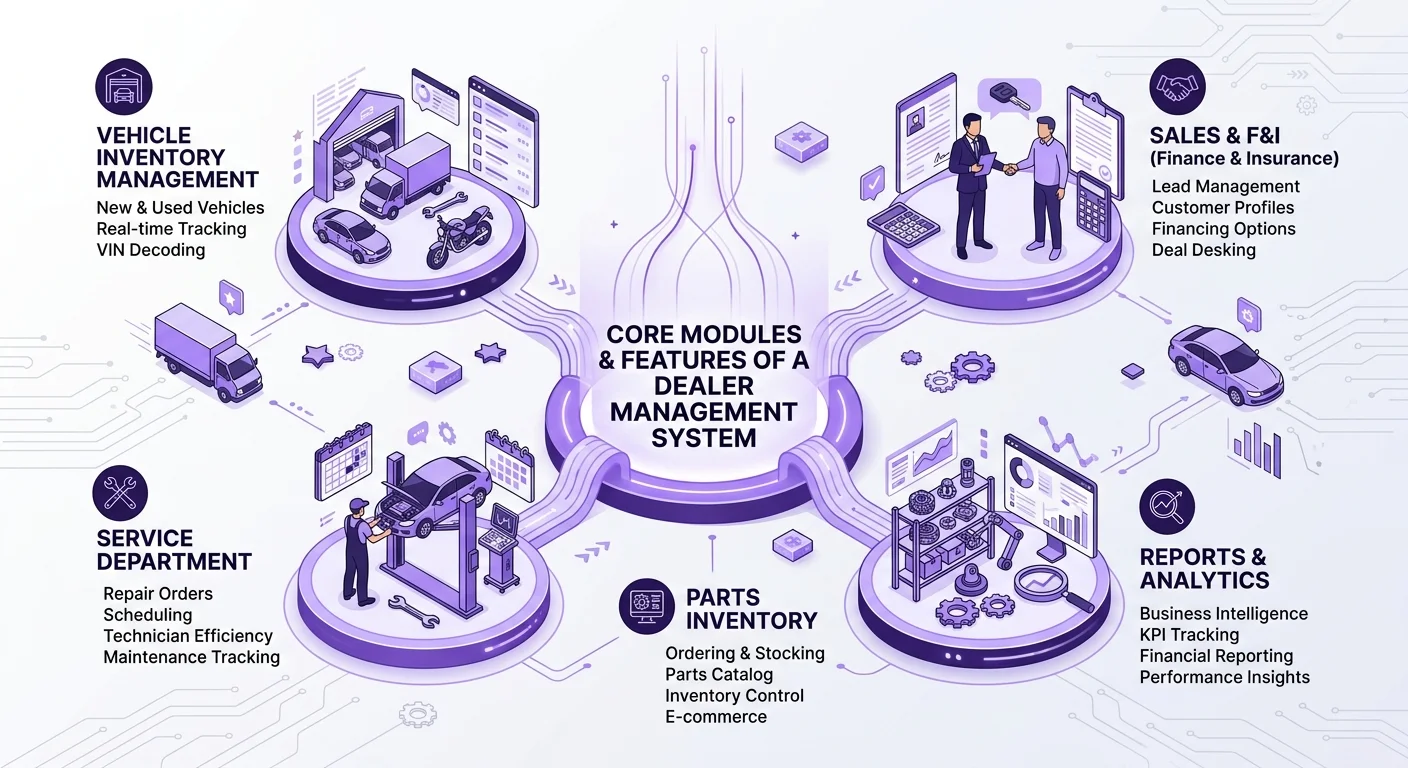
Every vendor packages its software differently, but most dealer management systems include the modules below.
Sales and Unit Inventory Management
The sales module tracks every new and used unit from acquisition to delivery. Look for VIN or serial number decoding, photo storage, aging reports, floor plan tracking, and quick quoting. Good inventory tools show your sales team what sits on the lot, what has arrived in transit, and what has already been sold, all at the moment they look.
Desking and Deal Structuring
Desking tools let sales managers compare payment options, add trade-ins, apply rebates, and present offers to the customer on a single screen. The DMS then carries those numbers into F&I without anyone typing them again.
Finance and Insurance (F&I)
The F&I module submits credit applications to lenders, prints or electronically signs contracts, and records sales of aftermarket products such as extended service contracts and GAP coverage. Strong F&I tools also keep a compliance trail for every deal.
Service and Fixed Operations
The service module runs your repair orders, appointment scheduling, technician time clocks, labor rates, and warranty claims. Advisors should be able to build estimates, convert them into repair orders, and send updates to customers by text. Service managers need clear views of technician efficiency and bay usage, because fixed operations often cover most of a dealership's overhead.
Parts Inventory and Point of Sale
A parts module manages stock levels, bins, special orders, and counter sales. The strongest systems load OEM and distributor price files automatically, suggest reorders based on seasonal minimum and maximum levels, and move parts between stores. An integrated point of sale speeds up counter transactions and card payments.
Accounting and Payroll
Some DMS platforms include full native accounting with a general ledger, accounts payable, accounts receivable, and financial statements formatted to OEM standards. Others connect to QuickBooks or another accounting package. Franchise dealers usually need native accounting that produces the monthly financial statement their manufacturer requires.
CRM and Customer Communication
Built in CRM tools track leads, schedule follow ups, and store every text and email inside the customer record. Two way texting has become a standard expectation, because customers answer texts far faster than phone calls.
Reporting and Dashboards
Reporting turns daily activity into decisions. A GM should be able to open one dashboard and see gross profit by department, units sold, open repair orders, parts sales, and cash position without waiting for someone to pull a report.
Industry Specific Modules
Specialty dealers need tools that auto dealers never touch. Marine dealers track slips and winter storage. Equipment dealers manage rental fleets, hour meters, and machine utilization. RV dealers handle long service queues and warranty work for multiple chassis and body manufacturers. Check for these modules early, because they separate a general DMS from one built for your business.
Outgrown Your Current DMS?
We map your sales, service, parts, and accounting workflows, then show you which systems to replace, connect, or keep before you sign a new contract.
Talk to a Dealership Systems ExpertTypes of Dealer Management Systems by Industry
Each segment runs on different workflows, so vendors specialize. Use this table to see which features matter most for your type of dealership.
| Dealer Type | Must Have Modules | Key Integrations |
|---|---|---|
| Franchise auto dealer | Desking, F&I, OEM financial statements, warranty claims | OEM portals, lenders, credit bureaus, CRM |
| Independent used car dealer | Inventory, deal structuring, buy here pay here loan servicing | Auction platforms, lenders, listing sites |
| RV dealer | Service scheduling, warranty processing, parts for multiple manufacturers | Chassis and coach OEMs, marketplaces |
| Marine dealer and marina | Slips, storage, haul outs, service, parts | Engine manufacturers such as Mercury, boat OEMs |
| Powersports dealer | Unit sales, parts and accessories, service | OEM dealer portals, price files |
| Agriculture and construction equipment dealer | Rentals, hour meter tracking, parts, field service | Major equipment OEMs, telematics |
| Truck and trailer dealer | Service bays, fleet accounts, parts | OEM warranty systems, fleet customers |
| Outdoor power equipment (OPE) dealer | POS, service, parts price files | Distributor catalogs |
Cloud vs On Premises vs Hybrid DMS
Where your DMS runs affects cost, security, and how your team works every day.
| Factor | Cloud DMS | On Premises DMS | Hybrid |
|---|---|---|---|
| Upfront cost | Low, paid as a monthly subscription | High, for servers and licenses | Medium |
| Updates | The vendor handles them automatically | Your IT team installs them | Split between both |
| Remote access | From any browser or mobile device | Limited without a VPN | Partial |
| Backups | The vendor backs up data offsite | You manage backups | Shared responsibility |
| Security | The vendor's security team protects it | Depends on your own IT staff | Shared responsibility |
| Best for | Most dealers in 2026 | Dealers with strict local control needs | Large groups mid migration |
Most dealers now choose cloud platforms because they remove server costs and let technicians, salespeople, and managers work from tablets and phones. Before you sign, ask any cloud vendor where it stores your data, how often it backs it up, and how quickly it can restore service after an outage.
DMS vs CRM vs ERP: What Is the Difference?
Buyers often mix up these three systems. Here is how they differ.
| DMS | CRM | ERP | |
|---|---|---|---|
| Main purpose | Runs the full dealership operation | Manages leads, follow ups, and customer relationships | Runs operations for general businesses and manufacturers |
| Built for dealers? | Yes | Dealer CRMs exist, but many are generic | Rarely, unless heavily customized |
| Handles service and parts? | Yes | No | Sometimes, but not dealer workflows |
| Handles F&I and deals? | Yes | Partly, through lead and deal tracking | No |
| Handles accounting? | Usually | No | Yes |
A CRM focuses on the sales funnel: capturing leads, assigning them to reps, and tracking every touchpoint until the sale. A DMS covers the entire business, including what happens after the sale. Many franchise dealers run a dedicated CRM alongside their DMS and sync customer data between the two. Smaller dealers often use the CRM tools built into their DMS and skip a separate subscription.
An ERP such as Microsoft Dynamics or SAP serves manufacturers and distributors. Some DMS vendors build their product on top of an ERP platform, but a plain ERP rarely handles repair orders, warranty claims, or desking without heavy customization.
Benefits of a DMS for Every Role in the Dealership
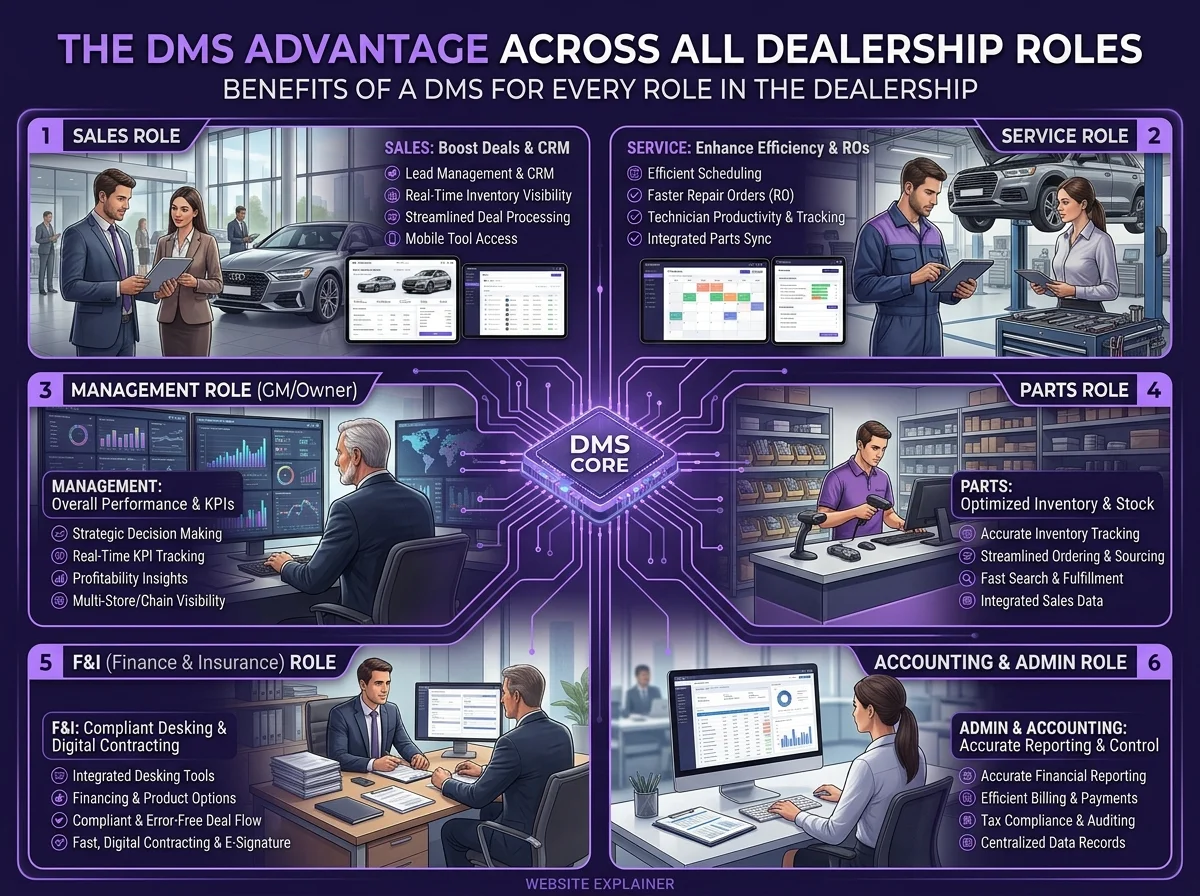
A DMS pays off differently depending on who sits in the chair.
Dealer Principal and GM
You see sales, gross profit, service revenue, and cash on one dashboard. You spot a slow department this week instead of discovering it on next month's financial statement.
Controller and Office Manager
Transactions post to the general ledger automatically, so month end closes days sooner. You spend less time reconciling and more time analyzing.
Sales Manager
You see every deal, every lead, and every unit on the lot in one place. Aging reports show which units need price adjustments before they cost you floor plan interest.
F&I Manager
Deal numbers flow in from the sales desk without errors, electronic contracting speeds funding, and the system keeps the records you need for compliance audits.
Service Manager
You see open repair orders, technician workloads, and hours billed against hours worked. You fill empty bay time and catch warranty claims before they expire.
Parts Manager
Automated reorder points cut stockouts and dead inventory. Price file updates keep your margins accurate without manual entry.
Technician
You clock onto jobs from a tablet, view service history for the unit in front of you, and request parts without walking to the counter.
Key Dealership KPIs Your DMS Should Track
Your DMS should calculate these numbers automatically. If it cannot, you will end up rebuilding them in spreadsheets.
| KPI | How to Calculate It | Why It Matters |
|---|---|---|
| Fixed absorption rate | Fixed operations gross profit ÷ total dealership overhead × 100 | Shows how much of your overhead service and parts cover without a single unit sale |
| Gross profit per unit | Total front end and back end gross ÷ units sold | Measures deal quality, not just volume |
| Inventory turn | Cost of units sold ÷ average inventory value | Reveals how fast your capital moves |
| Days supply | Units in stock ÷ average daily sales | Warns you before inventory ages |
| Technician efficiency | Hours billed ÷ hours clocked on jobs | Tells you how well technicians beat or meet labor times |
| Technician productivity | Hours clocked on jobs ÷ hours available | Exposes idle time in the shop |
| Parts fill rate | Requests filled from stock ÷ total requests × 100 | Shows whether your stock matches real demand |
| Customer retention rate | Returning service customers ÷ total unit buyers × 100 | Predicts future service and repeat sales revenue |
How Much Does a Dealer Management System Cost?
DMS pricing varies more than most buyers expect. The same software can cost two dealers very different amounts depending on users, modules, and contract terms.
Common Pricing Models
| Model | How It Works | Best Fit |
|---|---|---|
| Per user | You pay a monthly fee for each person who logs in | Small dealers with few staff |
| Per rooftop | You pay a set fee for each store location | Franchise dealers and dealer groups |
| Per module | You pay only for the modules you use, such as parts or service | Specialty dealers who grow into features |
| Tiered package | You choose a bundle of features at a set price | Dealers who want predictable billing |
Typical Price Ranges
Small and midsize specialty dealers often spend a few hundred to about fifteen hundred dollars each month. BiT's published FAQ says most dealers pay between $300 and $1,500 a month, with the final price tied to store size and the modules they choose. Large franchise auto dealers on enterprise platforms commonly pay several thousand dollars per rooftop each month once F&I, accounting, and integrations are included.
Hidden Costs to Ask About
The monthly fee rarely tells the whole story. Ask every vendor for a written quote that covers these items:
A Simple ROI Example
Suppose your service department loses about 20 billable hours a week to scheduling gaps and paper repair orders. At a $140 labor rate, that adds up to $2,800 a week, or roughly $145,000 a year. If a new DMS recovers even half of that time, it returns more than $70,000 a year before you count faster month end close, fewer parts errors, or better sales follow up. Run this math with your own labor rate and hours before you compare quotes.
DMS Security and Compliance: Lessons from the 2024 CDK Outage
Your DMS holds Social Security numbers, credit applications, driver's license images, and bank details. That makes it one of the most valuable targets a criminal can find in any small business.
The CDK Global Attack
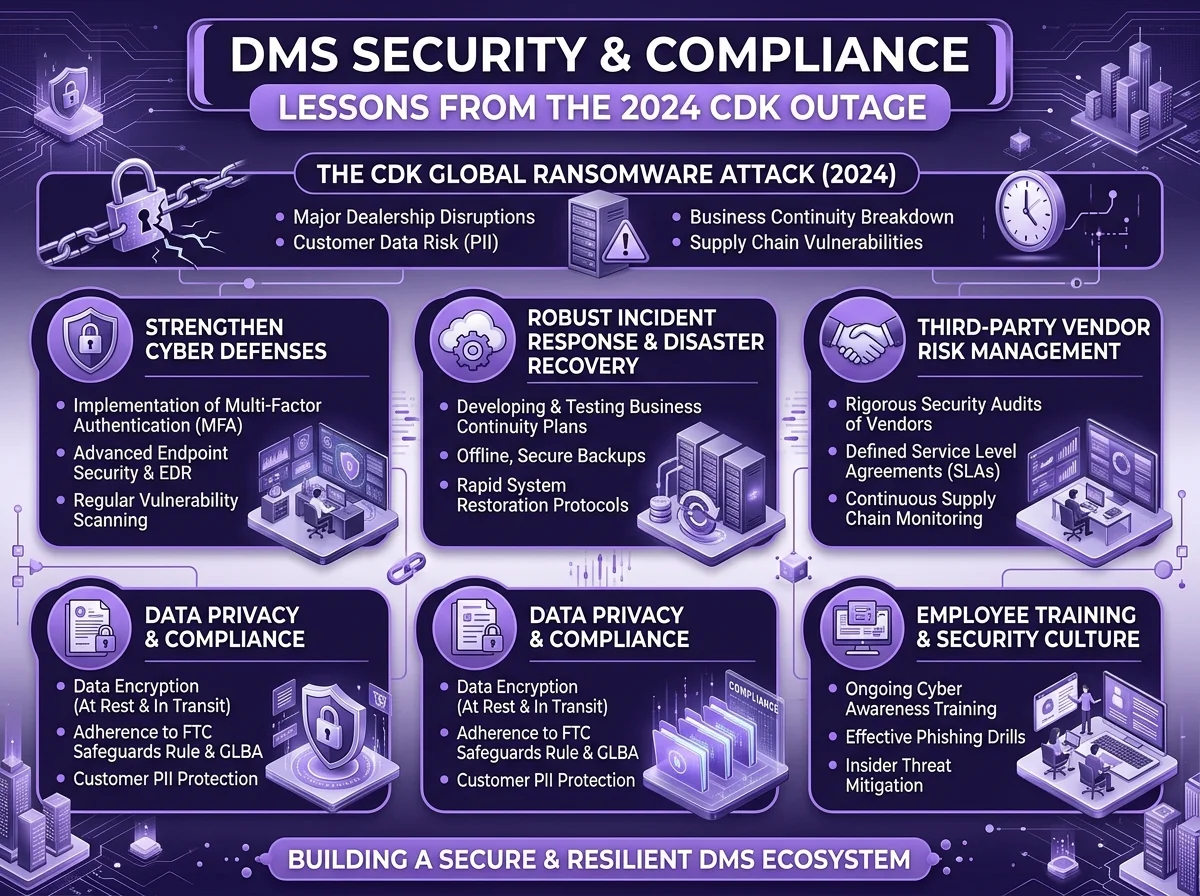
In June 2024, ransomware hit CDK Global and forced the company to shut down the DMS that close to 15,000 North American dealerships depended on. Many stores went back to paper deals and handwritten repair orders for about two weeks. Anderson Economic Group put the damage at roughly $944 million for affected dealers over the first three weeks, counting lost sales, lost service work, and interest on inventory that sat unsold.
The lesson for every dealer: ask what happens on the day your DMS goes down, before you sign.
The FTC Safeguards Rule
In the United States, the FTC treats dealers that arrange financing or leasing as financial institutions under the Gramm Leach Bliley Act. The updated Safeguards Rule requires covered dealers to designate a qualified individual who oversees information security, conduct written risk assessments, encrypt customer data, use multifactor authentication, keep a written incident response plan, and monitor their service providers. Since May 2024, covered businesses must also notify the FTC of security events that affect 500 or more consumers.
Your DMS vendor counts as one of those service providers. You remain responsible for choosing a vendor that protects your customers' data.
Security Questions to Ask Every Vendor
AI in Dealer Management Systems: What It Can and Cannot Do in 2026
Almost every DMS vendor now advertises AI features. Some deliver real time savings. Others are marketing labels.
Where AI Helps Today
Where AI Still Falls Short
AI cannot fix messy data. If your parts records carry duplicate numbers or your customer file holds three versions of every name, AI tools will produce confident but wrong answers. AI also cannot replace the judgment of an experienced service advisor or F&I manager dealing with an upset customer. Clean your data first, then add AI.
Signs You Have Outgrown Your Current DMS
Watch for these warning signs:
If three or more apply to your dealership, start evaluating replacements now. A DMS switch takes months, and you do not want to begin during your busiest season.
How to Choose the Right DMS: A 7 Step Framework
Step 1: Audit How Your Dealership Works Today
Walk through a deal, a repair order, and a parts sale with the people who do them every day. Write down every workaround, spreadsheet, and duplicate entry. These pain points become your requirements list.
Step 2: Separate Needs From Wants
Needs are the features you cannot operate without, such as OEM financial statements for a franchise store or slip management for a marina. Wants are features you would enjoy but could add later. Rank each one so you can compare vendors fairly.
Step 3: Confirm Industry and OEM Fit
Ask each vendor how many dealers in your segment use its system and which manufacturers it integrates with. A vendor that serves 500 marine dealers will understand your workflows far better than one that serves five.
Step 4: Check Integrations and Data Access
List every tool you use today: your website, CRM, lenders, payment processor, and OEM portals. Confirm that each one connects to the DMS, and get integration fees in writing.
Step 5: Review Security and Uptime
Use the security questions above. Ask for the vendor's uptime record over the past year and its written disaster recovery plan.
Step 6: Run Scripted Demos
Do not let vendors show you their favorite screens. Give every vendor the same three scenarios drawn from your real work, such as a trade in deal with a service contract, a warranty repair order, and a special order part. Have your department heads score each demo.
Step 7: Call References and Read the Contract
Ask each vendor for three references in your segment and your size range, and call all of them. Then read the contract closely for term length, price increase caps, data ownership, and exit fees. [Add a note on a contract clause that caught a dealer you know off guard.]
Choosing a CRM to Run Alongside Your DMS?
Compare VinSolutions, Elead, DriveCentric, and more by DMS integration, pricing, and user ratings.
Read the Automotive CRM Guide20 Questions to Ask Every DMS Vendor
DMS Implementation and Migration: What to Expect
A smooth DMS switch follows a clear plan. Most specialty dealers go live in four to twelve weeks. Large franchise groups often need three to six months.
| Phase | What Happens | Typical Length |
|---|---|---|
| Kickoff | You meet your implementation team and set goals and a launch date | 1 week |
| Data mapping | You and the vendor decide which records move and how fields match | 1 to 3 weeks |
| Data conversion | The vendor moves customers, units, parts, and history | 1 to 4 weeks |
| Configuration | The team sets up labor rates, tax rules, chart of accounts, and user roles | 1 to 3 weeks |
| Training | Each department learns its own workflows | 1 to 3 weeks |
| Parallel run | You test key transactions in both systems | 1 to 2 weeks |
| Launch day | You switch over and the vendor provides on site or remote support | 1 day to 1 week |
| 90 day review | You fix gaps, add reports, and retrain where needed | Ongoing |
Common Migration Mistakes
Leading Dealer Management System Providers at a Glance
This table lists well known vendors by the segment they serve best. It does not rank them. Test several before you choose.
| Provider | Best Known For | Pricing |
|---|---|---|
| CDK Global | Franchise auto dealers and large groups | Quote based |
| Reynolds and Reynolds | Franchise auto dealers | Quote based |
| Tekion | Cloud native platform for franchise auto dealers | Quote based |
| Dealertrack DMS (Cox Automotive) | Franchise and independent auto dealers | Quote based |
| PBS Systems | Franchise auto dealers in the US and Canada | Quote based |
| DealerBuilt | Midsize auto dealers | Quote based |
| Frazer | Independent used car and buy here pay here dealers | Published pricing |
| IDS Astra | RV, marine, and powersports dealers | Quote based |
| BiT DMS | Marine, RV, powersports, golf cart, and OPE dealers | Published starting price |
| DockMaster | Marinas and boat dealers | Quote based |
| DIS | Agriculture, construction, and lift truck equipment dealers | Quote based |
| e‑Emphasys | Equipment dealers | Quote based |
Glossary of Common DMS Terms
Final Thoughts
A dealer management system shapes how every person in your dealership spends their day. The right one gives your team one source of truth, frees technicians and advisors from paperwork, and shows you exactly where your profit comes from. The wrong one locks you into workarounds and contract fees for years.
Frequently Asked Questions

DMS stands for dealer management system. It is the software a dealership uses to run sales, financing, service, parts, and accounting in one place.
Small and specialty dealers typically go live in four to twelve weeks. Large franchise dealers and dealer groups often need three to six months because of data volume and OEM integrations.
Yes. Many modular cloud platforms let small dealers start with only the parts or service modules for a few hundred dollars a month, then add modules as they grow.
Your contract decides. Insist on a clause that says your dealership owns all its data and can export it in a usable format at any time without paying excessive fees.
It depends on the system. Some DMS platforms include full native accounting and replace QuickBooks entirely. Others sync with QuickBooks and send transactions to it automatically.
CDK Global and Reynolds and Reynolds have long held the largest share of the US franchise auto market, while Tekion has grown quickly in recent years.
Specialty segments such as marine, RV, and equipment use different leading vendors.
A CRM manages leads and customer relationships before and after the sale. A DMS runs the entire dealership, including inventory, F&I, service, parts, and accounting.