The Ultimate Guide For Dynamics 365 Business Central
Learn what Dynamics 365 Business Central is, who it’s for, its key features, pricing basics, and how it compares to NAV and QuickBooks. A practical guide for growing businesses.
Contact Us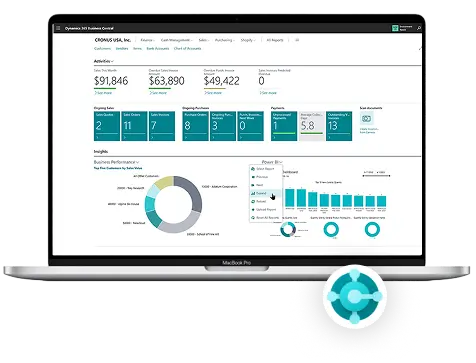
Every growing business reaches a point where spreadsheets and disconnected tools stop working. Managing finances, inventory, and customer data across separate systems creates costly errors, delays, and missed opportunities. Business Central solves exactly that problem.
Microsoft Dynamics 365 Business Central is a cloud-based ERP built for small and mid-sized businesses. It brings financials, operations, sales, and reporting into one unified platform so every team works from the same data in real time.
This guide covers everything you need to know about Business Central in 2026, what it is, who it is built for, its new features, pricing, implementation steps, and expert tips to help your business extract maximum value from day one.
What Is Microsoft Dynamics 365 Business Central?
Business Central is Microsoft's ERP platform designed specifically for small to mid-sized companies. It manages core operations, including accounting, inventory, purchasing, sales, and project management, all within a single, connected system.
It started as Navision, a Danish accounting product founded in 1984, which Microsoft acquired in 2002. It was rebranded as Dynamics NAV, then relaunched in 2018 as Dynamics 365 Business Central with a cloud-first design and deep Microsoft ecosystem integration.
Today, over 50,000 companies in 155+ countries run Business Central. It operates on Microsoft Azure, meaning no servers to manage, automatic security patches, and enterprise-grade infrastructure included with every subscription.
Business Central vs. Dynamics NAV: Key Differences
Many businesses still run Dynamics NAV, which served as a reliable on-premises ERP for decades. Understanding what changed with Business Central helps clarify why the upgrade matters and what is actually different between the two systems.
The most fundamental difference is deployment. NAV is an on-premises system that requires your own servers, manual upgrades, and an IT team to maintain it. Business Central is cloud-hosted, and Microsoft handles all infrastructure, updates, and backups automatically.
Business Central also introduces real-time data synchronization across all modules, native AI through Copilot, and seamless integration with Microsoft 365 and Power Platform, none of which were natively available in NAV. For businesses still on NAV, 2026 is the right time to make the move.
Who Is Business Central Best For?
Business Central is purpose-built for small and mid-sized businesses, typically those with 10 to 500 employees that have outgrown basic accounting tools but do not need the complexity or cost of a large enterprise ERP like SAP or Oracle.
It is an ideal fit for companies already using Microsoft 365 products like Outlook, Teams, and Excel. Because Business Central connects natively with these tools, adoption is significantly easier, and your team is already familiar with the Microsoft interface and workflow patterns.
Industries that benefit most include manufacturing, wholesale distribution, professional services, retail, and non-profit organizations. If your business manages inventory, projects, or multiple cost centers, Business Central has the depth to handle it all without requiring a custom-built solution.
Why Businesses Choose Business Central
With many ERP options available, the reasons businesses consistently choose Business Central come down to a combination of functionality, affordability, and the strength of the Microsoft ecosystem behind it.
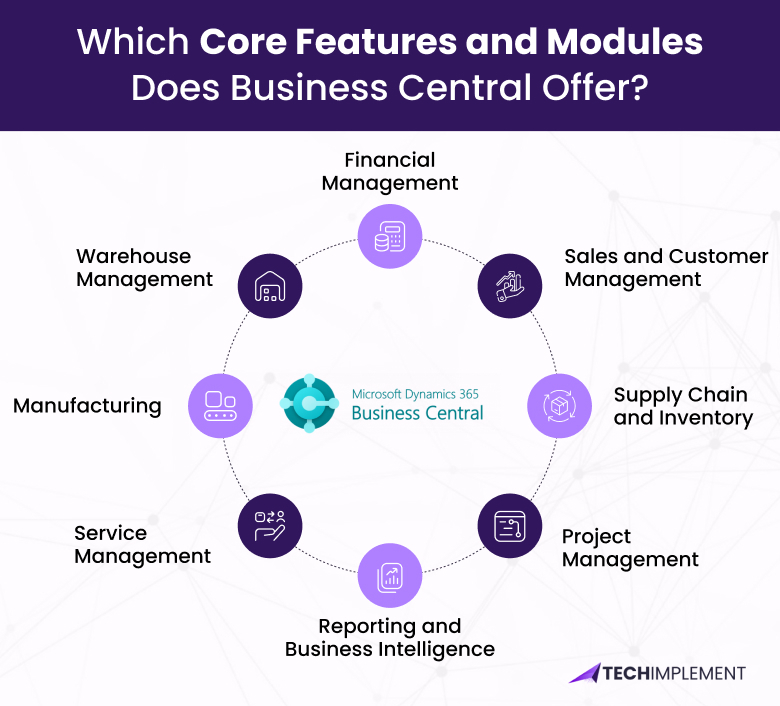
Which Core Features and Modules Does Business Central Offer?
Business Central is organized into functional modules. Together, they give businesses a complete view of their operations without needing separate tools for different departments. Here is what each key module does.
Financial Management
This module covers general ledger, accounts payable and receivable, bank reconciliation, fixed assets, and budgeting. Businesses get a real-time financial dashboard with multi-currency and multi-entity support built in from the start.
Sales and Customer Management
Sales teams can create quotes, manage orders, and track customer relationships directly in Business Central. The Outlook integration lets reps access customer history and send documents without ever leaving their inbox.
Supply Chain and Inventory
This module provides full visibility into stock levels, vendor relationships, and purchase orders. Demand forecasting, reorder automation, lot tracking, and multi-warehouse management are all handled from one connected system.
Warehouse Management
Warehouse teams can manage bin locations, pick-and-put-away processes, goods receipts, and shipment tracking. This module connects directly with inventory and purchasing to keep warehouse operations accurate and fully efficient.
Manufacturing
This module manages production orders, bills of materials, and capacity planning. The system links production schedules with live inventory data so teams always know what materials are available and when production runs can be completed.
Service Management
Available in the Premium license, Service Management handles service contracts, dispatching, repair orders, and service item tracking. It is designed for businesses that provide maintenance, warranties, or field service as part of their core offering.
Project Management
This module tracks billable hours, resource allocation, project costs, and milestones. It connects directly to invoicing, so there is no reconciliation gap between what was delivered to the client and what gets billed.
Reporting and Business Intelligence
Built-in reports and native Power BI integration give teams live dashboards covering sales performance, cash flow, inventory turnover, and profitability, all pulling directly from real-time Business Central data.
What's New in Dynamics 365 Business Central 2026
Microsoft follows a twice-yearly release cycle, Wave 1 in April and Wave 2 in October. The 2026 updates are heavily focused on AI, automation, and sustainability and represent the most significant step forward the platform has made in several years.
Copilot and AI Enhancements
Copilot is now deeply embedded across Business Central workflows. In 2026, it drafts sales content, summarizes financial reports, predicts late payments, and flags anomalies in transaction data, all based on your live business data, not generic patterns.
Agentic Workflows
The biggest 2026 update is the introduction of AI agents. These agents can execute multi-step tasks independently, matching invoices to purchase orders, flagging discrepancies, and routing approvals without requiring manual action at every step.
Model Context Protocol (MCP) Integration
Business Central now supports MCP, a standardized framework for connecting external AI models into the platform. Businesses can plug in specialized AI tools for demand forecasting or customer analysis alongside the built-in Copilot capabilities.
Sustainability Tracking
ESG compliance is becoming a legal requirement across many sectors. Business Central 2026 adds built-in sustainability tracking, letting businesses log carbon emissions, energy consumption, and waste data alongside their standard financial records.
Interface and Usability Improvements
The 2026 interface is cleaner and more intuitive. Navigation is simplified, mobile usability has improved significantly, and users now have broader personalization options to configure their workspace in a way that matches how they actually work.
Microsoft Copilot in Business Central 2026
Copilot works specifically with your business data, not generic inputs. It reads your actual customers, vendors, transactions, and inventory to deliver suggestions that are directly relevant to your operations every day.
Here is what Copilot handles inside Business Central in 2026:
The value of Copilot in 2026 comes from these capabilities working together. It reduces the routine decisions your team handles manually every day, freeing them to focus on work that actually requires human judgment.
Cloud vs. On-Premises: Deployment Options
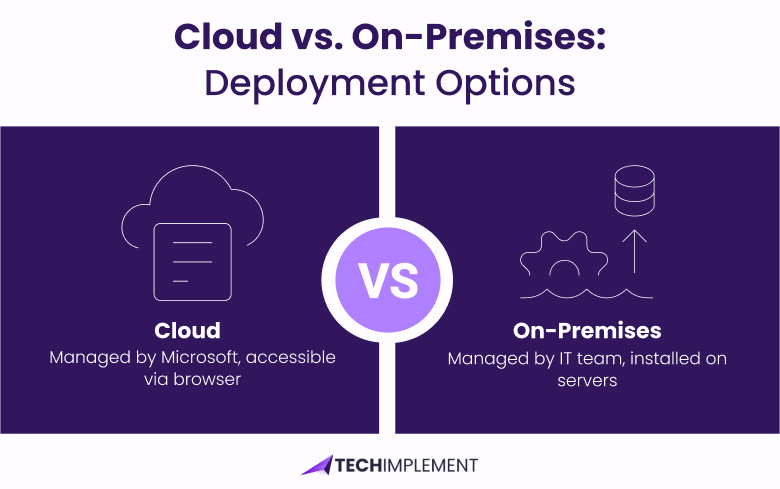
Business Central offers two deployment paths: cloud and on-premises. Understanding the difference helps businesses choose the right approach based on their infrastructure preferences, compliance requirements, and internal IT capabilities.
Cloud Deployment (Recommended)
The cloud version is hosted on Microsoft Azure. Microsoft manages all infrastructure, security, updates, and backups. Your team accesses Business Central through any browser on any device, making it the recommended option for most businesses in 2026.
On-Premises Deployment
The on-premises version is installed on your own servers. Your IT team manages infrastructure, updates, and maintenance. Pricing follows a different model from the cloud subscription, typically requiring a larger upfront investment plus ongoing support costs.
Which Should You Choose?
For most small and mid-sized businesses, cloud deployment is the right choice. It eliminates IT overhead, delivers automatic updates, and enables remote access from anywhere.
On-premises makes sense only when data sovereignty laws or legacy infrastructure requirements make cloud hosting impossible.
Pricing and Licensing in 2026
Business Central uses a per-user, per-month subscription model. Pricing is transparent and flexible; you pay only for the users and the level of functionality your business actually needs.
| License Type | Monthly Cost | What It Covers |
|---|---|---|
| Essentials | $70 / user | Finance, sales, supply chain, project management |
| Premium | $100 / user | Essentials + Manufacturing and Service Management |
| Team Member | $8 / user | Read-only access, approvals, and basic data entry |
How to Choose: Essentials vs. Premium
The decision between Essentials and Premium comes down to two specific modules: Manufacturing and Service Management. If your business does not actively use either of these, Essentials covers everything you need at a lower cost.
Choose Premium if your business produces goods and needs production orders, bills of materials, or capacity planning. Also choose Premium if you provide service contracts, manage equipment warranties, or dispatch field service teams regularly.
A common mistake is paying for Premium licenses across all users when only a subset of the team needs those advanced modules. Named user licensing means you can mix license types, giving Premium access only to the users who genuinely require those features.
Customization and Scalability
One of Business Central's most underappreciated strengths is how deeply it can be customized without replacing the core system. Microsoft built it on a development language called AL, which certified partners use to build industry-specific extensions and custom workflows.
These extensions install directly from Microsoft AppSource, the official marketplace for Business Central add-ons. There are thousands of certified apps covering payroll, e-commerce, advanced warehousing, field service, compliance reporting, and virtually every industry vertical.
From a scalability standpoint, Business Central grows with your business. You can add users, activate new modules, expand to additional legal entities or countries, and layer in new AppSource apps as your requirements evolve, all without re-implementing the core system.
Microsoft Ecosystem and Integrations
One of Business Central's strongest advantages is its native connection with tools most businesses already use. If your team runs on Microsoft, Business Central extends that environment, rather than adding a completely new system to learn.
Beyond native Microsoft tools, the AppSource marketplace extends Business Central's integrations to include payroll systems, e-commerce platforms, CRM tools, logistics providers, and industry-specific solutions, all certified by Microsoft.
Business Central vs. Competitors in 2026
Choosing an ERP is a significant decision. Here is how Business Central compares to the most commonly evaluated alternatives for small and mid-sized businesses in 2026:
| Feature | Business Central | NetSuite | QuickBooks |
|---|---|---|---|
| Best For | SMB / Mid-Market | Mid-Market | Very Small Biz |
| Cloud-Native | Yes | Yes | Yes |
| AI / Copilot | Advanced (2026) | Basic | Minimal |
| Microsoft Native | Yes | Via connectors | Via connectors |
| Starting Price | $70/user/mo | $999+/mo | $30/mo |
| Manufacturing | Yes (Premium) | Yes | No |
| Customization | High (AL + AppSource) | Moderate | Low |
Business Central wins for companies already in the Microsoft ecosystem, especially those needing manufacturing or project management at an SMB price point. NetSuite suits businesses that prefer a non-Microsoft environment. QuickBooks works for very small operations but reaches its ceiling quickly as a company grows.
Industry-Specific Use Cases
Business Central is flexible enough to serve a wide range of industries without requiring completely custom development. Here are the most common applications where it delivers strong, proven results.
Manufacturing
Manufacturers use Business Central to manage production orders, bills of materials, and capacity planning. The 2026 updates improve real-time shop floor visibility and tighten the connection between production schedules and live inventory data.
Distribution and Wholesale
Distributors rely on Business Central for multi-warehouse inventory management, purchase order processing, and vendor management. Copilot demand forecasting reduces costly stockouts and prevents excess inventory from accumulating at the wrong locations.
Professional Services
Consulting and service firms use the project management module to track billable hours, allocate resources, and connect project costs directly to client invoicing, all without needing a separate project management or time-tracking tool.
Retail and E-Commerce
Retailers connect Business Central to their online storefronts via AppSource integrations. Inventory levels, customer orders, and product data stay synchronized between the ERP and the storefront automatically in real time.
Non-Profit Organizations
Non-profits use Business Central for fund accounting, grant tracking, and compliance reporting. The platform makes managing restricted funds easier and produces the detailed financial documentation that regulators and donors require.
Step-by-Step Implementation Guide
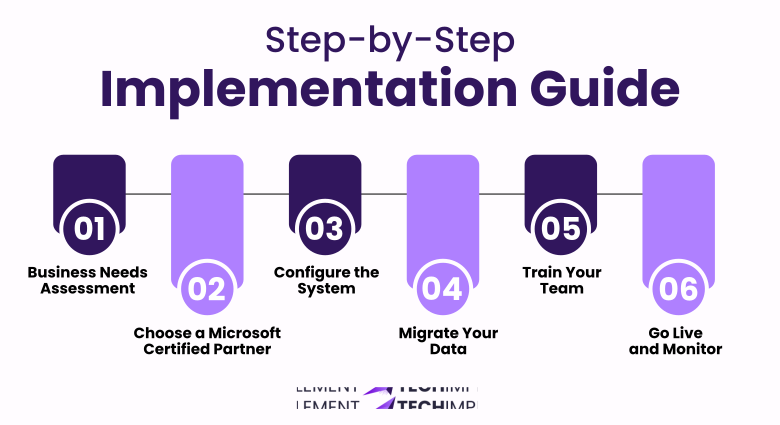
Implementing Business Central is a structured process. A clear plan from the start reduces risk, keeps timelines realistic, and drives stronger user adoption from the go-live day. Here is the standard roadmap most partners follow.
Step 1: Business Needs Assessment
Map your current processes and identify the specific problems Business Central needs to solve. This shapes every configuration decision and gives your implementation partner the context they need before any setup begins.
Step 2: Choose a Microsoft Certified Partner
Business Central is implemented through Microsoft partners. Choose one with experience in your industry and check their client references carefully. Your partner's capability has a direct impact on the quality and speed of your go-live.
Step 3: Configure the System
Your partner sets up Business Central to match your business, chart of accounts, approval workflows, user roles, and any custom logic your processes require. Good configuration at this stage reduces costly workarounds later.
Step 4: Migrate Your Data
Moving data from QuickBooks, spreadsheets, or a legacy ERP requires careful preparation. Clean up duplicate records and inactive accounts before migration. Dirty data imported into a new system causes problems that are very difficult to undo.
Step 5: Train Your Team
User adoption is the most common reason ERP projects underperform. Invest in role-based training at go-live, and plan for ongoing sessions as new staff join or new features roll out in each Wave update throughout the year.
Step 6: Go Live and Monitor
A phased go-live, starting with one department before expanding, reduces implementation risk significantly. Monitor closely for the first 90 days and keep your partner on standby for support during this critical window.
Typical implementation timelines range from 6 weeks for simpler setups to 6 months for complex, multi-entity organizations with significant data migration and customization requirements.
Expert Tips to Get the Most Out of Business Central 2026
Conclusion
Microsoft Dynamics 365 Business Central in 2026 is a mature, intelligent ERP platform built for businesses ready to move beyond disconnected tools. It unifies finance, operations, and sales in one system that scales as your company grows.
The 2026 updates, especially Copilot enhancements, agentic workflows, and sustainability tracking, represent a meaningful shift in how ERP software reduces routine work and helps teams make faster, better decisions with live data every day.
Whether you are evaluating Business Central for the first time, migrating from Dynamics NAV, or upgrading from QuickBooks, the right implementation partner and investment in user adoption will determine how much value you get. Business Central in 2026 has never been more capable, and the businesses that embrace it now will carry a clear advantage into the years ahead.
FAQs

Business Central is designed for small and mid-sized businesses, typically those with 10 to 500 employees. Many larger mid-market companies use it successfully. For very large enterprises, Microsoft offers Dynamics 365 Finance and Supply Chain Management as the next tier up.
Dynamics NAV is an on-premises ERP requiring your own servers and manual updates. Business Central is cloud-based, runs on Azure, and updates automatically. It also includes native AI through Copilot and deeper Microsoft 365 integration that NAV did not offer.
Yes. Microsoft provides migration tools, and most certified partners have a structured process for moving QuickBooks data into Business Central. The migration typically takes a few weeks, depending on data volume and how much historical data needs to be transferred.
Yes. Business Central has dedicated apps for iOS and Android. The web version is also fully responsive for tablet use. Field staff and leadership can access real-time business data from anywhere without needing to be at a desktop computer.
Microsoft releases two major updates per year: Wave 1 in April and Wave 2 in October. Minor hotfixes and improvements roll out continuously between major releases without disrupting business operations or requiring manual action from your team.
No. Business Central is a fully cloud-hosted SaaS solution on Microsoft Azure. Microsoft manages all infrastructure, security, and backups. Your team only needs a browser and an internet connection to get started. On-premises deployment is available but requires your own server infrastructure.
Choose Premium only if your business needs the Manufacturing or Service Management modules. If you manage production orders, bills of materials, or field service contracts — Premium is the right choice. For everything else, Essentials covers all the functionality most SMBs require.