How to Print Dynamic Columns in SSRS for D365 F&O
Learn how to print dynamic columns in SSRS for D365 F&O and create flexible, accurate reports that update automatically with every data change.
Contact Us
In today’s fast-moving business world, having reports that keep up with your data is no longer optional; it's essential. Imagine opening a report in D365F&O and seeing all the relevant columns automatically updated, reflecting the latest products, departments, or financial periods without touching a single setting.
Static SSRS reports with fixed columns often fall short, leaving you with extra work, outdated information, and delayed insights. That’s where dynamic columns come in. They let your reports expand, shrink, and adapt automatically, so every dataset is accurately represented, every time.
In this article, you’ll discover how to make your D365F&O reports smarter, understand the challenges to avoid, and learn best practices that save time, reduce errors, and make your reporting process truly future-ready.
Why Dynamic Columns Matter
Dynamic columns in SSRS adjust only when implemented through matrix column groups with metadata; SSRS alone does not auto-generate columns.
Use cases in D365F&O:
Benefits of dynamic columns:
Dynamic columns ensure reports are future-proof, reliable, and aligned with business requirements.
Common Challenges in D365F&O SSRS Reports
Creating dynamic columns presents several challenges:
Properly addressing these challenges ensures reports remain accurate, professional, and scalable.
Implementation Strategy
A structured approach is essential for implementing dynamic columns in SSRS for D365F&O:
1. Data Preparation
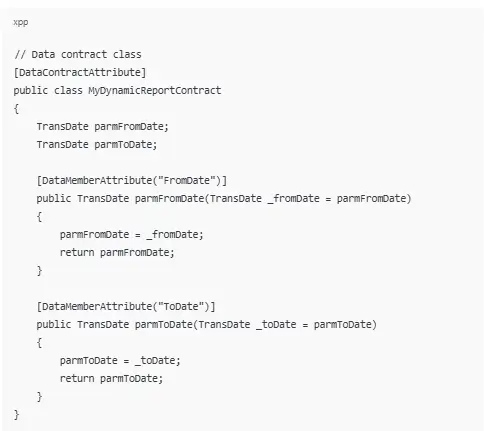
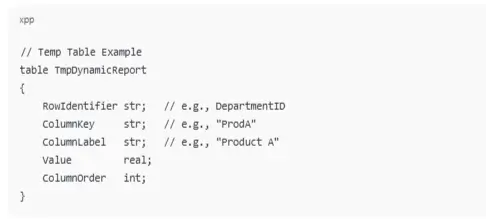
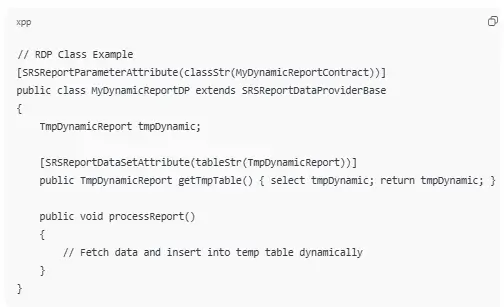
Code Example: Data Contract + Temp Table + RDP Class
2. Report Design
Use a Matrix control in SSRS for dynamic column generation
If you want a column serial number (like 1,2,3...) for dynamic columns, you can use custom code inside SSRS report:
Then in your column‑header textbox, use an expression like:

This will number dynamic columns in order they appear.
3. Formatting and Export
Example Expression for Row Total:

4. Testing
Best Practices
Common Mistakes to Avoid
Benefits for Enterprises
Dynamic column reports deliver tangible business value:
Dynamic reporting enables timely, data-driven decisions and supports enterprise growth.
Why Tech Implement is the Ideal Partner
Tech Implement specializes in custom SSRS reporting solutions for D365F&O, offering:
Partnering with Tech Implement ensures reliable, efficient, and flexible reporting systems that support real-time decision-making.
Real-World Example
A retail company needs monthly sales reports with variable product categories:
This demonstrates the practical impact of dynamic columns in real-world reporting.
Conclusion
Dynamic columns in SSRS reports for D365F&O are essential for flexible, accurate, and scalable reporting. Implementing them with best practices ensures reports are professional, readable, and actionable, saving time and supporting informed decision-making.
Enhance your D365F&O reporting with Tech Implement’s expertise. Contact us today to implement dynamic column SSRS reports that deliver flexibility, accuracy, and actionable insights for your enterprise.
FAQs

Dynamic columns allow decision-makers to view changing datasets instantly without manual intervention. By automatically displaying all relevant information, businesses can identify trends, compare categories, and act on insights faster, leading to more informed and timely decisions.
Yes. You can design dynamic columns to display different sets of information for different roles. For example, a finance manager may see department-wise revenue columns, while a warehouse supervisor sees product stock levels, all within the same report structure.
Matrix layouts in SSRS combined with metadata tables, RDP classes, or temporary tables enable dynamic column creation without hardcoding.
Dynamic columns are designed to adapt to new products, departments, or categories without manual updates. They rely on metadata-driven logic, so even if the dataset changes unexpectedly, the report automatically reflects the new structure, maintaining accuracy and readability.
While highly flexible, dynamic columns may face layout challenges in exports to Excel or PDF if too many columns are generated. Large datasets may require performance optimization, and complex calculations may need careful planning to avoid slow report generation.
Instead of manually updating reports whenever data changes, dynamic columns auto-generate relevant headers and data points. This reduces repetitive work, minimizes human errors, and allows report creators to focus on analyzing results rather than formatting reports.