Build Trust and Grow Smarter with Secure CRM Integrations
Discover how secure CRM integrations can boost your business efficiency, enhance customer relationships, and drive smarter growth with seamless technology.
Contact Us
Every customer interaction creates valuable data. But with this information comes serious responsibility. Customers demand their data stays protected. Business leaders need clear insights to make smart decisions. Teams need connected systems that work together seamlessly.
The solution lies in combining three essential elements: strong data privacy and compliance, powerful analytics and reporting, and smart CRM integrations. When these work together, you build customer trust, make data-driven decisions, and create unified systems where everyone operates from the same accurate information.
Why Trust Drives Business Growth
Customer trust translates directly to revenue. When customers trust your business, they share information freely, make repeat purchases, and recommend you to others. Businesses with strong data protection see customer retention improve by up to 27%.
Data breaches cost millions in fines, lost business, and damaged reputation. One security mistake can take years to recover from. That's why protecting customer data must be fundamental to your operations, not just a compliance checkbox.
Building Trust Through Data Privacy and Compliance
Data privacy means treating customer information with respect and protecting it from unauthorized access. Compliance ensures you follow legal requirements that protect customer rights.
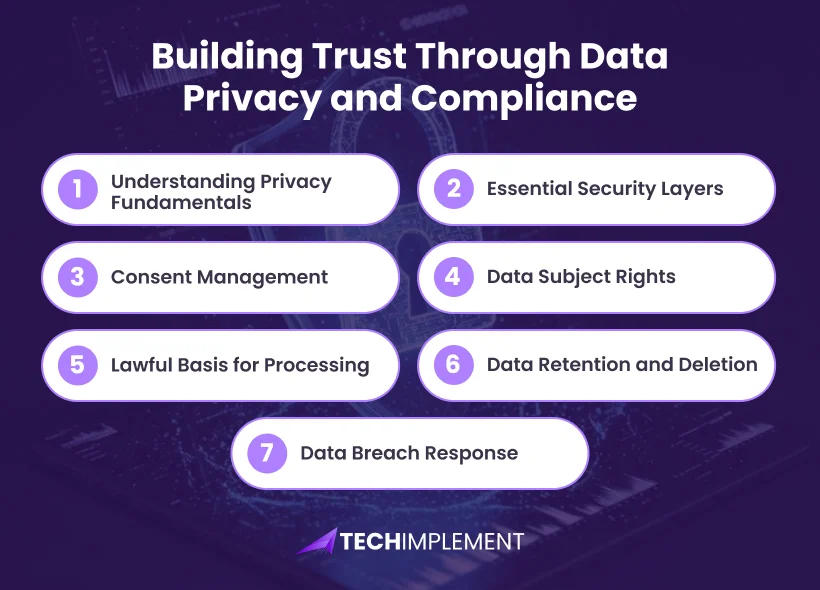
Understanding Privacy Fundamentals
Personal data includes contact details, browsing behavior, transaction records, and interaction history. Your responsibility extends beyond storage to include protection, appropriate usage, and giving customers control over their information.
Global privacy regulations mandate these protections. GDPR in Europe, CCPA in California, and HIPAA for healthcare all emphasize one principle: businesses must earn the right to handle customer data through responsible practices.
Essential Security Layers
Encryption transforms data into coded information unreadable without authorization. Use Transport Layer Security for data moving across networks and Advanced Encryption Standard with 256-bit keys for stored information.
Access management ensures team members only view information relevant to their roles. Marketing staff might need email addresses but shouldn't access financial details. Role-based permissions create appropriate boundaries around sensitive data.
Multi-factor authentication requires a second verification beyond passwords, such as a code sent to mobile devices. This blocks most unauthorized access attempts, even when passwords get compromised.
Security assessments identify vulnerabilities before malicious actors find them. Independent professionals test your systems regularly, searching for weak points in your defenses.
Audit trails automatically log every action taken on customer data, recording who accessed what information, when changes occurred, and what modifications were made. This creates accountability and helps you respond to compliance audits or security investigations.
Consent Management
Obtaining proper consent is a cornerstone of compliance. Your CRM must document when consent was given, for what purposes, and through which channels.
Valid consent requires clear language explaining what data you collect and why, separate opt-in for different processing activities (marketing emails versus order confirmations), and easy withdrawal mechanisms that are as simple as giving consent.
Documentation requirements include timestamps of consent, method of collection (web form, in-person, phone), specific purposes agreed to, and consent status (active, withdrawn, expired). Modern CRMs automate this tracking, creating detailed consent logs that demonstrate compliance during audits.
Data Subject Rights
Privacy regulations grant individuals specific rights over their data. Your CRM must facilitate these rights efficiently.
Right to Access means customers can request all data you hold about them. Your system should generate comprehensive reports showing personal information, processing purposes, and data sources.
Right to Rectification allows customers to correct inaccurate information. Provide simple mechanisms for updating records while maintaining audit trails of changes.
Right to Erasure (Right to be Forgotten) requires deleting customer data upon request, with certain legal exceptions like accounting requirements.
Right to Data Portability means exporting customer information in machine-readable formats like CSV, allowing them to transfer data to other services.
Right to Restrict Processing lets customers limit how you use their data. Your CRM should support status flags that prevent automated processing while maintaining records.
Lawful Basis for Processing
Every piece of data processing requires legal justification. GDPR recognizes six lawful bases:
Document which basis applies to each data category. Contact information for order fulfillment typically uses contract, while marketing communications require consent or legitimate interest.
Data Retention and Deletion
Define specific retention periods for different data types based on purpose and legal requirements. Customer contact information might remain active during business relationships, while marketing data may have shorter retention periods. Accounting records often require 7-10 years retention by law.
Implement automated deletion processes when data is no longer needed. Configure your CRM to flag records approaching deletion dates, execute automatic removal based on predefined rules, and maintain deletion logs proving compliance.
Data Breach Response
Compliance regulations mandate specific breach response procedures. You must detect breaches quickly through monitoring systems, assess impact within hours (not days), notify authorities within 72 hours if risks exist to individual rights, communicate with affected individuals when high risk exists, and document the entire incident and response.
Making Smarter Decisions with Analytics and Reporting
Collecting information is the starting point. Extracting meaningful insights transforms your business from assumption-based to knowledge-driven. Organizations using data-driven approaches achieve revenue growth between 8-10% while reducing operational expenses by approximately 10%.
Three Types of Analytics
Historical Analysis explains past performance, answering questions about customer acquisition, product sales, or revenue trends. This reveals patterns helping you understand what worked and what didn't.
Predictive Analytics estimates upcoming outcomes by examining past patterns. These tools forecast sales volumes, identify customers showing churn signals, or predict which prospects will most likely convert.
Prescriptive Recommendations suggest specific next steps beyond predictions. They might recommend personalized offers for customer segments, suggest optimal inventory adjustments, or identify the best outreach timing for prospects.
CRM Reporting Types
Different reports serve different business purposes. Understanding report types helps you extract maximum value from your data.
Leads Reports track lead sources, qualification rates, and lead-to-customer conversion. Monitor which marketing channels generate highest quality leads and where prospects enter your funnel.
Pipeline/Deals Reports display sales pipeline value by stage, deal age and velocity, win/loss rates, and forecast accuracy. These reveal where deals get stuck and help you forecast revenue accurately.
Funnel Reports track progression from initial contact through conversion, showing drop-off rates at each stage. This identifies bottlenecks in your sales process requiring attention.
Activity Reports monitor team actions including calls made, emails sent, meetings scheduled, and follow-up completion rates. These ensure your team maintains consistent customer engagement.
Essential Performance Indicators
Customer Retention measures how effectively you maintain existing relationships. Since acquiring new customers typically costs more than keeping current ones, this metric carries significant weight.
Conversion Rates reveal how efficiently you transform interested prospects into paying customers. Monitor this throughout your sales journey to identify where potential customers drop off.
Lifetime Value estimates total revenue each customer relationship will generate, helping determine appropriate investment levels for acquisition and retention.
Response Speed tracks how quickly your team addresses customer needs. Faster response correlates strongly with higher satisfaction and increased sales.
Pipeline Velocity measures how fast deals move from first contact to closed-won. Faster velocity indicates efficient sales processes and accurate qualification.
Deal Age shows how long opportunities sit in each pipeline stage. Deals aging beyond normal timeframes signal problems requiring immediate attention.
Real-Time vs Historical Reporting
Real-time dashboards update continuously as data changes, providing current snapshots of business performance. Use these for monitoring active campaigns, tracking daily sales activity, managing customer service queues, and identifying urgent issues requiring immediate action.
Historical reports analyze data over specific periods (monthly, quarterly, annually) to identify trends, compare performance across timeframes, conduct year-over-year analysis, and support strategic planning decisions.
Customizable Dashboards for Different Roles
Sales Representatives need pipeline visibility, individual quota progress, upcoming activities, and recent deal updates.
Sales Managers require team performance comparisons, pipeline coverage metrics, forecast accuracy, and coaching opportunities.
Marketing Teams focus on campaign performance, lead generation metrics, conversion funnel analysis, and ROI calculations.
Executives want high-level business health indicators, revenue trends, customer satisfaction scores, and strategic KPIs.
Modern CRMs allow customizing dashboards for each role, displaying only relevant information without overwhelming users with unnecessary data.
Creating Unified Systems with CRM Integrations
Data silos kill productivity. When sales, marketing, and customer service operate in separate platforms with different customer information, teams waste time reconciling conflicting data and miss opportunities for coordinated customer engagement.
What System Unity Delivers
A connected CRM environment links all business applications so they exchange information automatically. Customer updates reflect everywhere instantly. Sales transactions are visible to marketing immediately. Support resolutions gain organization-wide visibility.
This creates a single source of truth where everyone works from identical, current, accurate information. No more asking "which system has the right email address?" or manually updating customer details on multiple platforms.
Business Impact of Integration
Connected CRM systems can increase sales team productivity by 34%. This improvement comes from removing duplicate tasks and simplifying information access.
Data accuracy improves dramatically through automatic synchronization. Manual data entry creates errors at rates of 1-4%. Automated connections update thousands of records flawlessly without errors.
Customer experiences improve because your team possesses complete context for every interaction. Service representatives instantly view recent purchases, previous interactions, and active marketing communications, enabling personalized assistance without asking customers to repeat information.
Key Integration Categories
Marketing Connections link your CRM with email platforms, social media tools, and advertising systems. Track which campaigns generate qualified leads, automatically nurture prospects through targeted sequences, sync contact updates bidirectionally, and measure marketing ROI with closed-loop reporting.
Sales Connections integrate proposal software, electronic signature platforms, communication tools, and calendar systems. Sales professionals conduct calls, send quotations, schedule meetings, and monitor deals without switching applications.
Support Connections unite ticket management, live chat, help desk solutions, and knowledge bases with your customer database. Service teams access complete customer histories, view product purchase details, reference previous support cases, and resolve issues efficiently.
Financial Connections synchronize accounting software, payment processors, invoicing systems, and inventory management. Sales teams gain real-time visibility into customer payment status, product availability, credit limits, and order history.
Data Flow Management
Understanding how information flows between systems is critical for maintaining data integrity.
Bidirectional Sync means changes in either system update the other automatically. When a customer updates their email in your support system, it changes in your CRM and marketing platform simultaneously.
Scheduled Batch Updates transfer data at specific intervals (hourly, daily) rather than real-time. This works well for less time-sensitive information like monthly reports or historical data archives.
Triggered Updates initiate data transfers based on specific events. When a deal closes, the CRM might trigger customer record creation in accounting software, add contacts to onboarding email sequences, and notify the support team.
API Integration Methods
Application Programming Interfaces (APIs) allow different systems to communicate securely. Most modern business tools offer APIs enabling custom integrations.
REST APIs are the most common type, using standard web protocols to exchange data. They're relatively simple to implement and widely supported.
Webhooks enable real-time notifications between systems. When specific events occur (new lead created, deal won), webhooks immediately send data to connected applications.
Pre-built Connectors offered by platforms like Zapier or Make eliminate coding requirements. These provide point-and-click integration setup between popular business tools.
How Security, Analytics, and Integration Create Unified Customer Views
When these three pillars work together, they create comprehensive customer understanding that drives business growth.
Protected integrations enable data to flow securely between systems while maintaining encryption and access controls. Your analytical capabilities expand because they draw from all business tools, not just isolated databases. The trust you establish through robust security encourages customers to share richer data, which powers more insightful analytics.
Consider an e-commerce business. Secure integration connects their online store, CRM, email marketing platform, support system, and inventory management. When customers make purchases, transaction data flows safely to all connected systems. Analytics examine buying patterns across channels, predict which products to stock based on browsing and purchase history, identify loyal customers warranting VIP treatment, and forecast demand for inventory planning.
Customer trust grows because the business protects payment information, personalizes shopping experiences without being creepy, responds quickly to support inquiries with full context, and maintains consistent communication preferences across all touchpoints.
Revenue increases through informed decisions about inventory management, targeted marketing based on actual behavior, personalized product recommendations, and proactive customer service that prevents churn.
Competitive Advantages
Organizations mastering all three elements gain measurable advantages. They adapt to market changes faster because data and systems work in harmony. They earn greater customer loyalty through superior protection and experiences. They waste fewer resources because analytics reveal what generates results. They scale operations efficiently because integrated systems handle growth without proportional staffing increases.
Your Implementation Roadmap
Evaluate Your Current State
Examine your existing situation honestly. How well does your setup protect customer data? Can you respond to data subject requests within required timeframes? What analytical questions remain unanswered? Which systems should communicate but don't? Where do teams waste time on manual data entry or reconciliation?
Rank Your Priorities
Order priorities based on risk exposure and opportunity potential. Security vulnerabilities enabling data breaches demand immediate attention. Compliance gaps risking regulatory fines follow closely. Analytics improvements supporting better decision-making come next. Time-saving integrations eliminating duplicate work round out priorities.
Select Appropriate Technology
Choose a CRM platform with demonstrated security features including encryption, role-based access controls, regular security assessments, and compliance certifications like SOC 2 or ISO 27001.
Verify analytical capabilities including customizable dashboards, multiple report types, real-time and historical analysis, and export options for deeper analysis.
Confirm integration support through native connectors for your existing tools, robust API documentation, webhook capabilities for real-time updates, and marketplace of third-party integrations.
Develop Team Capabilities
Invest in comprehensive training covering why security, analytics, and integration matter for business success, how to use specific CRM features correctly, what to do when they encounter issues, and their role in maintaining compliance.
Establish clear protocols defining what information to collect, how to store and categorize it, who to contact when something seems wrong, and procedures for handling data subject requests.
Monitor and Refine Continuously
Establish recurring reviews of security measures through quarterly security assessments, monthly access right audits, and continuous monitoring of login attempts and data access patterns.
Review analytical insights by examining dashboard usage monthly, updating KPIs as business priorities evolve, training teams on new reporting capabilities, and gathering feedback on information needs.
Assess integration performance by monitoring data sync success rates, investigating failed transfers, optimizing slow processes, and expanding connections as new tools are adopted.
Avoid Common Mistakes
Don't attempt everything simultaneously. Start with manageable projects delivering clear value, then expand systematically. Avoid selecting tools based solely on popularity—choose what fits your actual requirements. Don't overlook change management. New systems only succeed through proper adoption, so involve end users in selection, provide adequate training, celebrate early wins, and gather continuous feedback.
Moving Forward with Confidence
Building trust through data privacy and compliance, making informed decisions with powerful analytics and reporting, and creating unified systems through smart CRM integrations represents essential requirements for modern business success.
Begin today with a single action: strengthening security protocols, implementing consent management, connecting two critical systems, or establishing your first analytical dashboard. Whatever it is, start now.
Your customers will place greater trust in your organization when you protect their data and respect their rights. Your team will work more efficiently when systems communicate seamlessly. Your business will make smarter decisions based on comprehensive, accurate information. And you'll construct a foundation delivering value for years ahead.
Learn more more about the AI Powered CRM Personalization
The organizations winning in their markets aren't necessarily the largest or most established. They're the ones that protect customer trust through robust security and compliance, learn from their data through powerful analytics, and operate from unified systems through intelligent integration. Your business can achieve the same success.